Arreat Summit MP3 Player#
The Arreat Summit includes a basic MP3 player coded in Flash. It’s conceptually simple:
Sound metadata (title, arist, MP3 URL) is stored in an XML file that is hosted on their server. This makes adding and removing music trivial
The MP3 URL points to an MP3 file hosted on their server. These files still exist despite the fact that the player is unusable!
A simple Flash program plays music from that URL using the built-in AS2 Sound class. It also handles the playlist, showing title and artist, and transport controls. This could probably be pretty easily replaced with a network playlist for VLC, or a custom HTML5 client.
If you go to Arreat Summit and click on the MP3 player link it will open a new window at http://classic.battle.net/window.shtml.
window.shtml#
Note
The .shtml extension means the file has Server Side Includes. This is meaningless to the user…
Here is the entire source
<!DOCTYPE html PUBLIC "-//W3C//DTD XHTML 1.0 Transitional//EN" "http://www.w3.org/TR/xhtml1/DTD/xhtml1-transitional.dtd">
<html xmlns="http://www.w3.org/1999/xhtml" xml:lang="en" lang="en">
<head>
<meta http-equiv="Content-Type" content="text/html; charset=iso-8859-1" />
<title>Battle.net Sound Player</title>
<style type="text/css">
<!--
body {
    margin-left: 0px;
    margin-top: 0px;
    margin-right: 0px;
    margin-bottom: 0px;
}
-->
</style></head>
<body bgcolor="#999999">
<!--url's used in the movie-->
<!--text used in the movie-->
<!--
1
-->
<object classid="clsid:d27cdb6e-ae6d-11cf-96b8-444553540000" codebase="http://download.macromedia.com/pub/shockwave/cabs/flash/swflash.cab#version=6,0,0,0" width="283" height="227" id="player" align="middle">
<param name="allowScriptAccess" value="sameDomain" />
<param name="movie" value="player.swf" />
<param name="quality" value="high" />
<param name="bgcolor" value="#999999" />
<param name='menu' value='false'>
<embed src="player.swf" quality="high" bgcolor="#999999" width="283" height="227" name="player" align="middle" allowScriptAccess="sameDomain" type="application/x-shockwave-flash" pluginspage="http://www.macromedia.com/go/getflashplayer" />
</object>
</body>
</html>
This may look like a gray square but… wait…
Uh oh! Flash!
player.swf#
Download: http://classic.battle.net/player.swf
Tip
New to Flash decompiling? Consider JPEXS Free Flash Decompiler
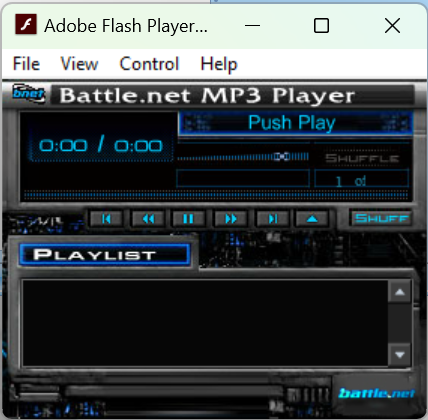
There’s a script on Frame 1 that, when loaded, sets _global.xml_location = "sounds.xmls";
There’s a load script on Frame 2 for myLoadVar that parses the XML:
onClipEvent(load){
    _root.nextSong = 0;
    _root.playing = 0;
    _soundbuftime = 5;
    _root.songList = new XML();
    _root.songList.ignoreWhite = true;
    _root.songList.onLoad = function(success)
    {
        var _loc1_ = _root;
        if(success)
        {
            _loc1_.numberOfSongs = _loc1_.songList.firstChild.childNodes.length;
            _loc1_.indexSongNumber = _loc1_.numberOfSongs - 1;
            a = 0;
            while(a < _loc1_.numberOfSongs)
            {
                _loc1_["song" + a] = new Sound();
                _loc1_["xmlSong" + a] = _loc1_.songList.firstChild.childNodes[a].childNodes[1].childNodes;
                _loc1_["xmlArtistName" + a] = _loc1_.songList.firstChild.childNodes[a].childNodes[2].childNodes;
                _loc1_["xmlSongTitle" + a] = _loc1_.songList.firstChild.childNodes[a].childNodes[0].childNodes;
                _loc1_.songBox.song_list.addItem(_loc1_["xmlSongTitle" + a],a);
                a++;
            }
        }
        else
        {
            trace("not loaded yet");
        }
    };
    _root.songList.load(_global.xml_location);
}
Tip
Here’s the docs for Sound: https://open-flash.github.io/mirrors/as2-language-reference/Sound.html
This is what happens when you click the Play button:
on(press){
    _global.ogre = "go";
    if(_root.paused != 1 && _root.playing != 1)
    {
        stopAllSounds();
        if(_root.randomPlay == 1)
        {
            if(_root.nextRandomSong > _root.numberOfSongs)
            {
                _root.nextRandomSong = 0;
            }
            _root.nextSong = _root.myRandomArray[_root.nextRandomSong];
            _root.nextRandomSong = _root.nextRandomSong + 1;
        }
        _root["song" + _root.nextSong].loadSound(_root["xmlSong" + _root.nextSong],true);
        stopAllSounds();
        _root["song" + _root.nextSong].start(0,0);
        _root.playing = 1;
        _root.paused = 0;
        _root.songBox.song_list.setScrollPosition(_root.nextSong);
        _root.songBox.song_list.setSelectedIndex(_root.nextSong);
    }
    else
    {
        _root["song" + _root.nextSong].start(_root.pausePosition,0);
        _root.playing = 1;
        _root.paused = 0;
    }
    _root.btnInfoText = _global.pause_btn;
    _root.playpause.gotoAndStop("pause-roll");
}
sounds.xmls#
Download: http://classic.battle.net/sounds.xmls
Schema:
<?xml version="1.0" encoding="UTF-8"?>
<root>

<audio>
  <title>SC: StarCraft Title Screen</title>
  <audioURL>/supersecrest/title.mp3</audioURL>
  <artist>StarCraft Soundtrack</artist>
</audio>
<!-- <audio> is repeated, once per track -->

</root>
That example points to http://classic.battle.net/supersecrest/title.mp3
Note
Yes, it’s supersecrest (notice the s as the second-last character). No, I don’t know why it looks like someone misspelled supersecret or supersecrets. Unless it’s a joke: the misspelling makes it more super-secret that usual.
Downloading#
Here’s a simple Python program that walks the tree and downloads each track:
import sys
import urllib.parse
import urllib.request
import xml.etree.ElementTree as ET
from pathlib import Path


_HOST = 'http://classic.battle.net'


def main() -> int:
    # Download http://classic.battle.net/sounds.xmls
    tree = ET.parse('sounds.xmls')
    root = tree.getroot()

    for audio in root.findall('audio'):
        audio_url = audio.find('audioURL').text
        host_url = _HOST + audio_url
        print(host_url)
        name = Path(audio_url).name
        with urllib.request.urlopen(host_url) as http:
            with Path(name).open('wb') as f:
                f.write(http.read())

    return 0

if __name__ == '__main__':
    sys.exit(main())
Running#
You can get this working:
Download player.swf and sounds.xmls
Put
player.swfandsounds.xmlsin the same directoryModify
<audioURL>insounds.xmlns. Currently it’s treated as an absolute path to Unix root/supersecrest/foo.mp3. You can use any path you want; the simplist (fewest modifications) is local relative files with./supersecrest/foo.mp3orsupersecrest/foo.mp3. You can download the MP3s using the sample Python script above. (Unfortunately, it doesn’t work with files hosted onhttp://classic.battle.net/supersecrest/foo.mp3due to sandboxing and Flash security.)Launch the projector.
Open
player.swf